Windy.app - Enhanced forecast
- 4.8
- Rating
- 10.00M
- Installs
- Free
- Price

 Analysis by App-foxy
I usually install weather apps for one practical reason: I want to know whether the day will cooperate with my plans. Windy.app - Enhanced forecast immediately feels more focused than a standard weather app because it treats wind, water, and changing conditions as the main story rather than a small line beneath the temperature. I found it especially interesting for outdoor routines where direction and timing matter, not just whether an icon shows sun or rain.
This is a free weather app from Windy Weather World Inc, available for Everyone and running on devices with Android 6.0 or later. Its store presence is substantial, with an average rating of 4.8 from around 378 thousand ratings, more than 10 million installs, and roughly 5.4 thousand written reviews. Those figures suggest it has become a regular tool for many people, but popularity alone does not answer the important question: does it remain useful once the novelty of a detailed map wears off?
After spending time with it, my answer is yes, but only for the right kind of user. If I only need a quick morning temperature, a simpler forecast app is faster. If I sail, fish, paddle, cycle, hike, photograph outdoors, or simply need to understand how wind will affect a plan, this app earns a much stronger place on my phone.
You May Also Like

 Blood Strike: 2.5 Anniversary
Blood Strike’s Loadouts Turn Every Drop Into a Tactical Gamble
A close look at Blood Strike’s custom loadouts: how fast access to signature weapons reshapes its battle royale rhythm, rewards preparation, and narrows the gap between fights.

 Pandora - Music & Podcasts
Pandora’s Music Is Easy to Start, but Harder to Recover
Pandora’s strength is its low-effort path from a seed to a station. Its weak spot is how much confidence it asks you to place in connection, setup, and quiet recovery.

 8 Ball Pool
 Is Built on Rivalries, Rematches, and Routine
A close look at the rivalries, rematches, shared routines, and unanswered safety questions that turn a quick pool match into a persistent mobile community.

 Samsung Music
’s Quiet Strength Is Playing What You Already Own
Its reach comes less from spectacle than from dependable access to a personal library. That simplicity is both the app’s strongest retention engine and its ceiling.

 AccuWeather: Weather Radar
AccuWeather Review: A Quick, Clear Forecast for Everyday Decisions
For everyday plans, the best forecast is the one you can understand quickly. AccuWeather makes rain timing, radar, and local conditions easy to act on, with a few trade-offs.

 Hill Climb Racing
Why Hill Climb Racing Still Turns Crashes Into One More Run
A tiny car, a bumpy hill and one more upgrade: Hill Climb Racing keeps resurfacing because its simple chaos makes every near-miss feel personal.
More From Our News Desk
View All News


Why the first week feels so engaging
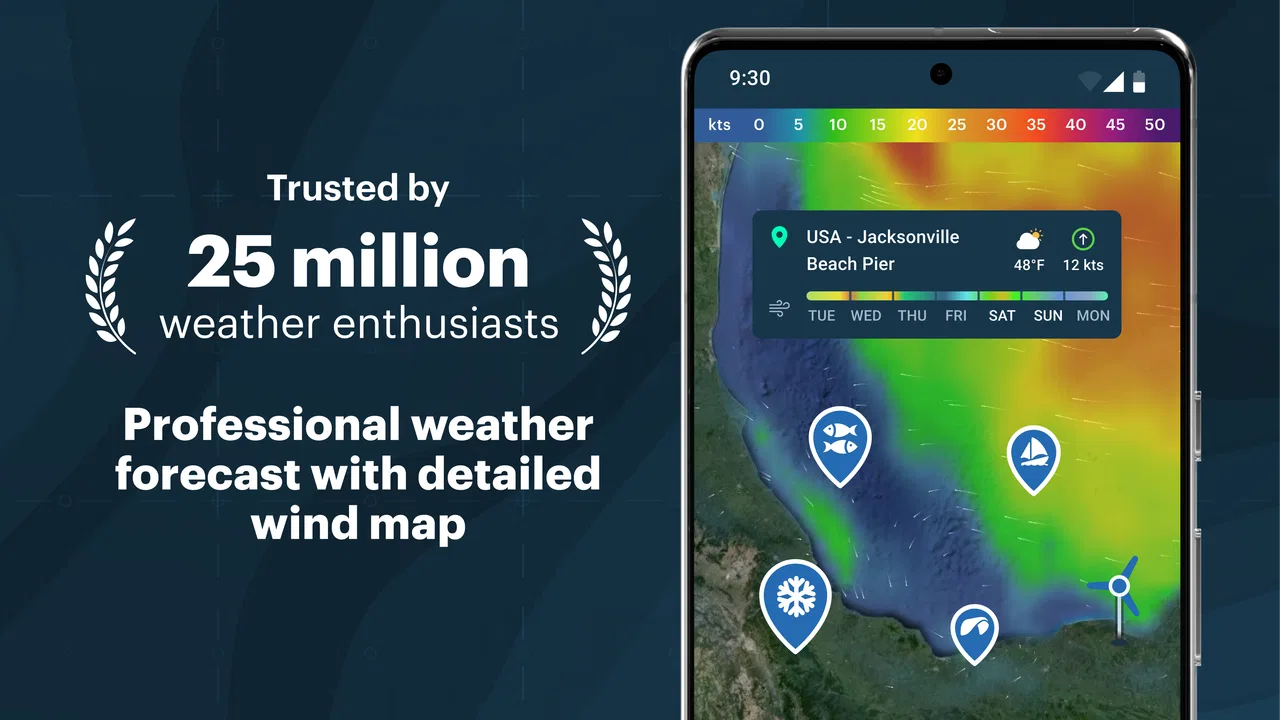
The first thing that caught my attention was the map. Instead of presenting weather as a vertical list of hourly numbers, the app encourages me to look at movement across an area. Wind direction and speed become something I can interpret visually, which is more useful than reading a single wind value for one location. I can see why this approach appeals to people who plan around exposure, open water, ridgelines, or changing coastal conditions.
The map also changes the way I think about a forecast. A normal weather app may tell me that my town will be windy. Here, I can think about where that wind is coming from and how conditions may differ a short distance away. That distinction matters when a sheltered park, a beach, a lake, and a hill are all within the same general region. The app is not merely answering “what is the weather?” It is helping me ask “which part of the area is most suitable?”
The widget is another reason the app can become part of a daily routine quickly. I do not always want to open a full forecast before leaving home, so having a glanceable view is practical. The best use is not checking it once and forgetting it, but using it as a trigger: I see the wind trend, then open the map only when the conditions deserve closer attention.
During a first week, I would recommend setting up a few places that genuinely matter rather than filling the app with every destination I have ever visited. A home location, a regular outdoor spot, and one place connected to an upcoming plan are enough to learn whether the app fits my habits. Too many saved locations can turn a useful forecast into a small catalog that I rarely maintain.
The tide and wave information gives the app a clear identity. These details are not especially valuable to someone checking a city commute, but they can be central when choosing when to visit a shoreline or deciding whether a water-based activity is sensible. I like that the app brings wind, tides, and waves into one planning view instead of forcing me to switch between several specialized services.
That combination creates a strong first-week appeal for outdoor-minded users. I can compare the general forecast with the conditions that actually affect a location. A warm day may still be uncomfortable on an exposed coast if the wind is strong, while a cooler day can be pleasant in a sheltered place. The app makes those trade-offs easier to notice.
Learning to read the detail without overreacting
The main challenge in the opening days is learning not to treat every visual change as a major event. A detailed map can make weather feel more precise than it really is. I found it better to look for broad patterns first: whether the wind is building, easing, or changing direction; whether waves and tides line up with my plans; and whether conditions remain consistent across several forecast periods.
This is one of the app’s less obvious lessons. More information does not automatically mean better decisions. The map is most helpful when I use it to compare scenarios, not when I stare at every small variation. For example, if I am deciding between two walking routes, the map can help me choose the less exposed option. It is less helpful if I keep refreshing it in search of certainty that no forecast can provide.
I also would not use this app as a substitute for local judgement in serious outdoor situations. A forecast can support a decision, but it cannot account for every obstacle, local current, sudden change, or personal limitation. The app is a planning aid, not a permission slip to take unnecessary risks.
What keeps it useful from month to month
The strongest long-term value comes from repeated decisions rather than casual browsing. I can imagine opening it before a weekend hike, checking a sailing window, choosing a fishing time, or deciding whether a cycling route will be pleasant. Those are recurring situations, and the app’s focus on wind direction, speed, tides, and waves gives me information that a basic weather screen may bury or omit.
For a coastal user, the workflow is particularly convincing. I can check the broad weather picture, inspect wind direction, consider wave conditions, and then look at tide times before deciding when to go. That sequence is more useful than checking an hourly temperature chart alone. It also reduces the need to remember which separate services usually provide each piece of information.
For cyclists and runners, the value is slightly different. Wind direction can change how difficult an outward journey feels and whether the return trip becomes easier or harder. I find this more actionable than simply seeing a wind number. A route that looks comfortable at the start may become unpleasant if the strongest wind arrives on the exposed section later in the day.
Hikers can use the same idea around ridges and open terrain. I would not rely on a map view alone to judge safety, but it can help compare a sheltered valley with an exposed route. Photographers may also appreciate the ability to plan around changing conditions rather than only cloud icons. The app is most worthwhile when the weather affects the quality or comfort of an activity, not merely whether I carry an umbrella.
There is also value for people who work outdoors. A gardener, surveyor, event worker, or maintenance professional may care about wind and timing more than a casual forecast user does. In those cases, the app can become a quick planning checkpoint before equipment, travel, or outdoor work begins.
Still, I would not claim that everyone needs this level of detail. If my routine is mostly commuting between buildings, checking school pickup conditions, or deciding what coat to wear, the usual phone weather widget may be better. It is quicker, less demanding, and probably sufficient. Windy.app earns its space when its specialized information changes what I do.
A practical routine that prevents unnecessary checking
My preferred monthly routine would be simple. I would check the app once when planning an outdoor activity, again closer to the day, and then make a final look before leaving if conditions matter. This is better than repeatedly opening the map throughout the day. Frequent checking can create anxiety without improving the decision, especially when the forecast is shifting within normal limits.
One useful habit is to compare the forecast for the exact place where I will spend time rather than relying on the nearest large town. Wind behaves differently around water, hills, buildings, and open fields. The app’s map encourages that more precise thinking, but I still need to choose the location carefully. A forecast for a nearby urban center may not represent a beach, summit, or exposed trail accurately enough for my plan.
Another good habit is to read direction together with speed. Speed alone tells me how strong the wind may feel, while direction tells me whether it will be behind me, against me, or crossing my route. That small change in interpretation is one of the most useful things I took from the app. It turns a number into a planning question.
How much maintenance the app demands
The maintenance burden is moderate rather than heavy. A weather app should not require constant management, and this one can work as a glanceable tool once I know which locations and views I actually use. The widget helps because it reduces the number of full app launches for routine checks.
However, the detailed nature of the product means I need to maintain my own discipline. I have to avoid saving too many irrelevant places, avoid treating every map layer as essential, and remember that a forecast is something to revisit at sensible intervals. The app itself may be easy to keep installed, but using it well requires a little more attention than opening a basic weather panel.
The current version is 87.2.3, and the app supports Android devices from version 6.0 onward. That broad compatibility makes it accessible to people using older phones, although the experience may naturally feel more comfortable on a larger screen when studying a map. On a small display, detailed weather information can become cramped, and I would rather use the widget for quick checks than explore a large map for long periods.
The pricing model is also worth considering. The app is free to install, while in-app purchases range from $4.99 to $299.99 per item. That range makes it important to understand my own needs before paying for anything. A casual user should begin with the free experience and decide whether the app has become part of a real routine. A professional or highly committed outdoor user may find advanced access worthwhile, but I would not spend simply because the map looks impressive during the first few days.
This is a key long-term trade-off: the app can provide more value as my use becomes more specialized, but its detailed presentation can also tempt me to buy before I know whether I will return regularly. I would wait until I had used it across several real plans and weather changes. That gives me a better basis for judging whether any purchase solves a recurring need rather than satisfying initial curiosity.
Notifications and widgets, where I choose to use them, should support a routine rather than create noise. Weather information loses some of its usefulness when every change feels urgent. I would keep only the locations and checks that connect to actual decisions, especially if I already use another service for general forecasts.
Where fatigue can set in
The biggest source of fatigue is information density. The map is the app’s strength, but it is also the reason some users may stop opening it. When I only want to know whether I need a jacket, a detailed wind and water view can feel like too much work. A simpler alternative wins in those moments because it answers the immediate question faster.
There is also a learning curve in translating weather information into a personal decision. Wind direction is meaningful once I relate it to a route or location, but it may feel abstract at first. Tides and waves are valuable for the right activities and almost irrelevant for others. The app does not become universally useful just because it includes more categories of information.
Another limitation is the risk of false confidence. A clean animated map can look authoritative, and I may be tempted to believe that a narrow forecast window is exact. In practice, I would treat it as guidance and look for stable patterns rather than obsess over small differences. For demanding outdoor plans, local knowledge and appropriate safety preparation still matter more than visual polish.
The app may also feel excessive if I mainly need severe-weather alerts, a very simple daily summary, or an integrated experience with other phone services. In those cases, the usual default weather app may be more convenient. A specialized tool is not automatically a better replacement for a general one; sometimes it works best beside it.
On the other hand, replacing it with a basic forecast app can create its own friction if I regularly need wind, tides, or waves. Switching between separate sources may take longer and make it harder to compare conditions in one planning session. The right choice depends on whether my weather questions are broad or activity-specific.
Who should skip it
I would skip this app if I rarely spend time outdoors, never plan around wind or water, and want only a quick temperature and precipitation glance. I would also be cautious if I dislike maps, prefer very minimal interfaces, or know that I tend to overcheck changing forecasts. In those situations, the extra detail may become clutter rather than help.
I would recommend trying it if wind affects my comfort, route, work, or safety decisions. It is especially suitable for people who repeatedly visit the same outdoor locations and can build a habit around checking them. The app becomes more valuable with context; without that context, it is simply a more elaborate way to look at weather.
Does it earn lasting space?
For me, Windy.app - Enhanced forecast earns lasting space when I use it as a decision tool rather than a weather toy. The first-week appeal comes from the map and the feeling of seeing conditions in a richer way. The month-to-month value comes from repeated activities where wind direction, speed, tides, and waves genuinely affect timing or location.
I appreciate that it can serve several outdoor interests without forcing me to assemble every detail from unrelated apps. That makes it more than a decorative forecast screen. At the same time, I would not keep it as my only weather app if I needed the fastest possible everyday summary. Its strengths are specialized, and its extra detail has a real cost in attention.
The free starting point is sensible for testing the fit, while the in-app purchase range means I would make any upgrade decision slowly. I would first establish a routine, use the map for real plans, and see whether the widget and saved locations continue to help after the initial excitement. If they do, the app has recurring value. If I stop opening it once the novelty fades, a simpler alternative is the more honest choice.
My final recommendation is therefore conditional but positive. Outdoor planners, coastal visitors, sailors, anglers, cyclists, hikers, and anyone whose day depends on wind should give it a serious trial. People seeking only a basic forecast should probably stay with a simpler option. The lasting strength of this app is not the amount of weather information it displays, but how well that information changes a real decision.
FAQs for Windy.app - Enhanced forecast
01What features does Windy.app offer for weather forecasting?
Windy.app provides a comprehensive suite of features including real-time weather maps, wind forecasts, and radar overlays. It offers detailed information on wind speed, direction, temperature, and precipitation. Additionally, users can access tide charts, weather alerts, and personalized weather reports tailored to outdoor sports enthusiasts.
02Is Windy.app suitable for outdoor sports enthusiasts?
Yes, Windy.app is specifically designed with outdoor sports enthusiasts in mind. It offers specialized forecasts for activities like sailing, kiteboarding, surfing, and hiking. Users can customize their forecast settings to receive the most relevant information, ensuring a safe and enjoyable experience regardless of the weather conditions.
03How accurate is the weather forecast provided by Windy.app?
Windy.app uses data from multiple reliable sources, including the European Centre for Medium-Range Weather Forecasts (ECMWF) and the Global Forecast System (GFS). This multi-source approach enhances the accuracy of its predictions, making it a trusted tool for both casual users and professionals who require precise weather information.
04Can I use Windy.app offline or without internet access?
While Windy.app offers powerful online features, some functionalities are limited without internet access. Users can download maps for offline viewing, which is useful in remote areas. However, real-time updates and live radar features require an internet connection to function effectively.
05Is Windy.app free to use, or does it require a subscription?
Windy.app is available for free with basic features, but it also offers a premium subscription plan. The Pro version unlocks additional features such as more detailed forecasts, enhanced map options, and ad-free usage. Users can choose based on their needs, with the option to upgrade for a more comprehensive experience.
Pros
- Highly accurate weather predictions.
- Wide range of map layers available.
- User-friendly interface.
- Customizable alerts for weather changes.
- Includes detailed wind data.
Cons
- Requires internet for updates.
- Some features need a subscription.
- Complex data may overwhelm novices.
- Limited offline capabilities.
- Occasional app crashes reported.

Windy.app - Enhanced forecast
Gallery